AI Model
If you don't see the Model page, please enable the Advanced View mode from the Setting page
The Model page allows you to manage models in ANSVIS Server that can be used for custom AI Tasks
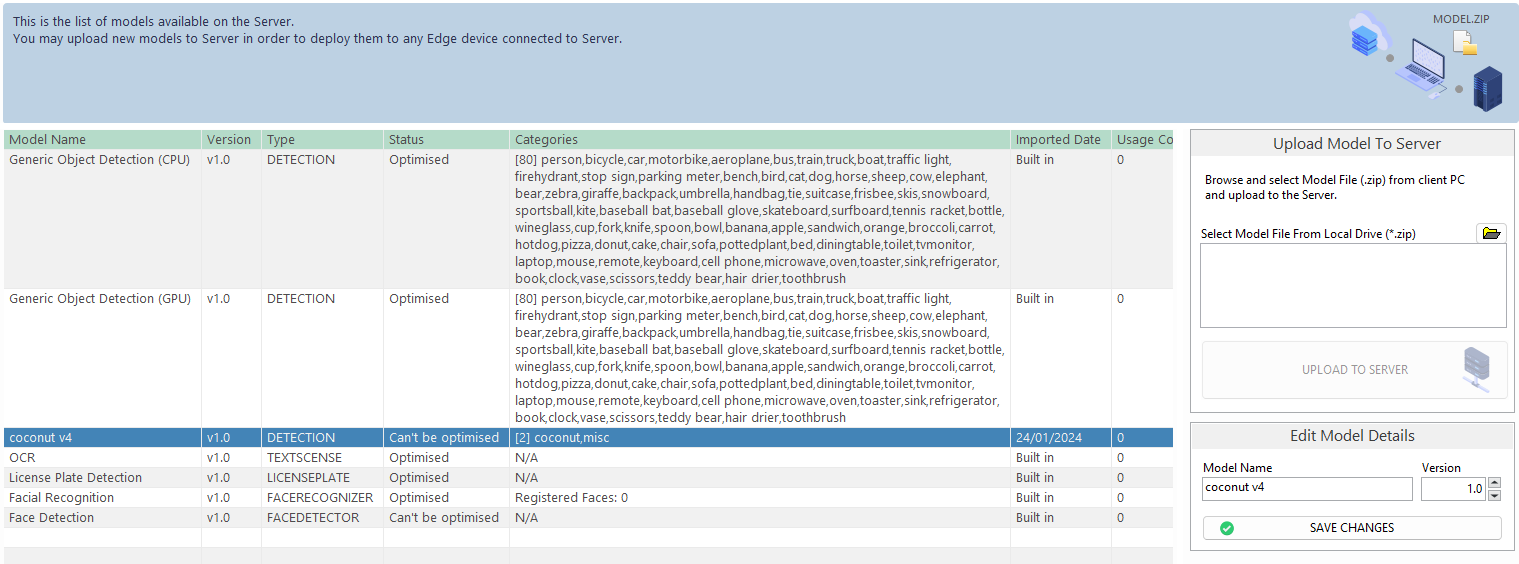
When the ANSVIS server is first launch in your machine, AI model will take some time to optimize for your hardware
Unknown: Server is checking model status
Not optimized: Model is waiting for optimization turn
Being optimized: Model is being optimized, ANSVIS server will optimize model one at a time
Optimized: Model is optimized. AI Tasks can only run when the related models are optimized
Can't be optimized: Model that can't be optimized for current hardware but usable, though performance may reduce
Failed optimization: Model optimization failed. This can be due to corrupted engine, a clean reinstallation may required.
When creating AI tasks, you will be able to set minimum model score (and/or sensitivity) for the selected model.
-
Model score indicates the overall accuracy of the AI model in its detection (both positive and nagative case). For example, if a model detects a person with a score of 0.92 (92%), it means it is 92% certain the detected object is a person. However, a high score can still be misleading if it's given from a poorly trained model.
-
Model sensitivity is an extra metric (applied for some models only) that measure how well the model finds all the "positive" instances (true positive). A higher sensitivity mean the model is more aggressive in detecting object and vice versa. In scenarios where missing a positive case has serious consequences (e.g., medical diagnostics for a serious disease), high sensitivity is crucial to minimize the number of false negatives.
Choosing the suitable value help filter out uncertain results. The ideal threshold depends on your specific use case, how important accuracy and sensitivity are, and whether you prefer to avoid wrong detections (false positives) or missed detections (false negatives).
Built-in models
ANSVIS provides several built-in models which can be recognized by the built-in imported date, such as: VehicleDetection, FireDetection, Facial Recognition, License Plate Recognition, GenericOD, and more will be provided in future updates
Refer to Model Quality to learn more about ANSVIS built-in models
User's Uploaded Models
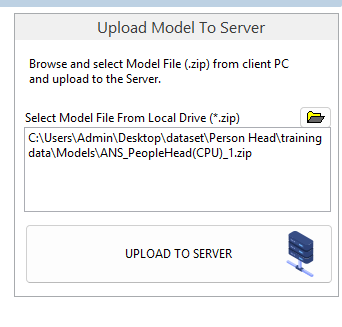
You can upload your new models to the ANSVIS Server:
- Browse to the model location and select the model file.
- Click**
Upload to Server**.
ANSTS models
The ANS Training Studio (ANSTS) allows users to train their own custom computer vision models (classification, object detection, etc.) and import them directly into ANSVIS. The ANSTS supports exporting models into CPU (OpenVINO) and GPU (TensorRT) formats.
ANSVIS Custom models
The ANSVIS Custom Function offers a structured framework for designing custom analytic functions, models, or pipelines to seamlessly integrate and execute within the ANSVIS Server environment, utilizing OpenCV 4.10.
3rd-party models
Third-party models can be integrated into ANSVIS as long as they are compatible with a C++ runtime environment. For model conversion guidance and integration support, please contact us.